
Download
Microsoft 365 Security Aspects Guide
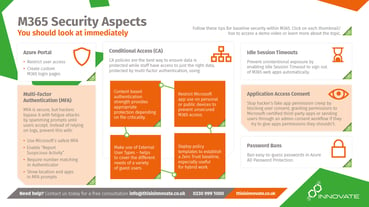
Disscover our essential asset for IT managers—a how-to guide designed to secure your Microsoft 365 environment and ensure a safer, more efficient workspace. This guide highlights critical areas such as Multi-Factor Authentication (MFA) settings (such as showing app and location in push notifications) and how to roll out a Zero Trust conditional access policy using deployment guides (including video tutorials).
Fill out the form to download.
FAQ
Why Is Proactive Cybersecurity Essential for M365?
Investing in prevention minimises recovery costs and helps reinforce trust with your customers by ensuring their data is securely managed.
What Common Misconfigurations Should I Look Out For?
Be vigilant against disabled MFA, inactive audit logs, active former accounts, and untested backup systems, all of which can leave critical gaps in your security.
How Does the Free Guide Help My Organisation?
This guide outlines step-by-step instructions to review and enhance your M365 settings, ensuring that your security measures are robust and up-to-date.
Why Is Proactive Cybersecurity Essential for M365?
While M365 offers many security features, they require active management. Our guide helps you implement the best practices needed to stay ahead of emerging threats.
Can I Rely Solely on Secure Score for Cybersecurity Assurance?
Secure Score provides a useful snapshot of your security posture, but it should be part of a comprehensive, proactive strategy to ensure full protection.