
In this blog post, we’ll provide you with practical guidance on Microsoft-specific controls to protect approvals and payments in Microsoft 365 to protect you from your next cybersecurity incident.
Why Deepfakes Have Changed the BEC Playbook
If you’ve been following the rise of AI at all, you can tell how much the technology has improved since we’ve seen the first iteration of an AI-generated video (one famous example is that of Will Smith eating spaghetti in 2023). The technology has progressed by leaps and bounds since, making deepfake voice and video not only tremendously convincing but also lowering the effort of criminals to impersonate leaders or suppliers.
However, one thing hasn’t changed: urgency and authoritative language as the core tactic. The new risk lies in fraud attempt that are consistent across channels (e.g. email, phone and Teams). Why? Because even out-of-band verification without extra steps – like a phone call with the CEO -can get manipulated thanks to voice cloning.
How BEC Typically Succeeds in Microsoft 365 Environments
We’ve addressed BEC in great detail in our last blog post, but here are some of the approaches we see out in the field:
-
Route A: Compromised mailbox through AI phishing leads to token/session capture and as a consequence mailbox rules/forwarding.
-
Route B: Lookalike domains and display-name spoofing - no compromise needed
-
Route C: Compromised third party (supplier account compromised)
-
Route D: Teams/SharePoint abuse via malicious links, filesharing, and impersonation
And what’s the end point? Payment redirection, payroll diversion, invoice fraud or gift scam cards.
From Impersonation to Payment Request in Six Steps
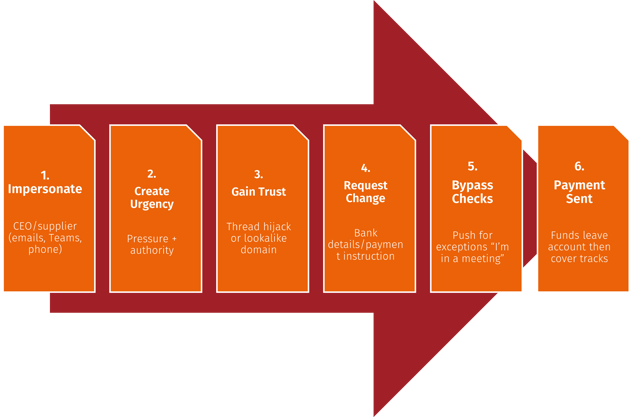
But not all hope is lost, below a list of things for you to consider in Entra ID to make it more difficult for criminals to get in.
Controls That Matter Most in Microsoft 365 and Entra ID
Identity Controls (Entra ID)
Enforce Multi-Factor Authentication (MFA) if you haven’t already done this, so that even if a criminal has acquired login credentials, they would still need to overcome the barrier of an additional step of verification. This is especially important for those high-risk IDs of executives, finance, payroll and admins.
Implement Conditional Access (CA) policies that block legacy authentication (as it doesn’t support MFA), and require compliant devices and approved apps for high-risk users via Intune. This means you’ll prevent devices that don’t meet certain requirements (e.g. minimum operating system and being anon-rooted device) and “random” apps hackers may be using from accessing your systems
Another step further is implementing risk-based policies (if you have Entra ID P2/Entra Suite) to respond to risky sign-ins as indicated by an unusual location, device, behaviour patterns, and known compromised infrastructure.
And lastly, reduce privilege by creating separate admin accounts and also limit who can change payment-related systems. If a hacker happened to gain access to an account, they would at least still be bound by the limitations you’ve given it.
Next, lets look at email controls.
Email Controls (Microsoft Defender for Office 365)
Ensure you have anti-phishing and impersonation protection turned on (especially for executives/finance), but equally safe links/safe attachments.
Also important are external sender labelling and warning banners (but this setting shouldn’t be too sensitive, otherwise users will just end up ignoring them) according to domain authentication basics. Sender Policy Framework (SPF), DKIM (Domain Keys Identified Mail) and DMARC (Domain-based Message Authentication, Reporting &/ Conformance) are email authentication standards that help stop attackers from spoofing (= imitating) your domain. SPF tells recipients which mail servers are allowed to send on your behalf, DKIM adds a cryptographic signature to prove a message really came from an authorised sender and hasn’t been altered, and DMARC ties the two together by telling receiving systems what to do when checks fail (monitor, quarantine, or reject) and providing reporting. They’re very effective at reducing straightforward “this looks like it’s from yourcompany.com” spoofing, especially once DMARC is enforced but unfortunately don’t stop lookalike domains, display-name impersonation, or BEC where criminals use compromised real accounts inside Microsoft 365. That’s why authentication is a necessary baseline but needs further measures.
Governance Controls
External Forwarding
When attackers compromise a mailbox, one of the first things they try to do is set up external forwarding (or a redirect rule) so that every relevant email also lands in an attacker-controlled inbox. That allows them to keep receiving email even if you reset the password or kick them out and to watch supplier threads, invoices, approvals, and internal comms in real time. Why? Finding the exact moment to jump in when payment is due or details are being discussed. What can you do to prevent it? Restrict external auto-forwarding.
Mailbox Rules and Delegate Changes
Cybercriminals also commonly create mailbox rules and permissions changes to hide evidence and control conversations. “Send as” and “send on behalf” also lets the attacker send convincing messages from the real identity and run multiple conversations from a single compromised identity. While you usually use mailbox rules to keep it tidy, a hacker would move or delete supplier responses, move finance messages or mark them as read using them to keep under the radar while being able to send emails from the victim’s address. Using rules prevents the victim from seeing replies, so they won’t realise someone else is responding. Additionally, finance-related trigger keywords for rules like “invoice”, “payment”, “bank” and “IBAN” allows threat actors to target relevant conversations with laser precision. For this reason, monitor and alert on mailbox rule creation and delegate changes.
App Consent
Attackers increasingly use OAuth (standard way for an app to get passwordless access to data) consent abuse by tricking a user into granting a malicious (or compromised) app permission to access Microsoft 365 data.
They use this to:
- Read mail (sometimes all mail)
- Send mail as the user
- Read/write files (OneDrive/SharePoint)
- Read directory data (users, groups)
- Maintain access “offline” (long-lived access via refresh capability)
What to do: introduce app consent governance – and admin consent for high-risk scopes.
Protecting High-Risk Roles: CEOs, Finance, Payroll (Without Breaking Productivity)
It’s a known fact that higher security unfortunately also inconveniences users if not implemented without prior testing/piloting. For that reason, it’s important to scope and prioritise on a practical basis.
This includes defining “high-risk roles” and why they’re targeted and creating a “high-risk users” group for stronger policies
We suggest the following security as the baseline for this group:
-
-
- stronger authentication requirements
- device requirements for access
- tighter session controls (where appropriate)
- extra monitoring and faster escalation
-
How can this go wrong? Common pitfalls we see are too many exemptions, shared accounts for finance workflows and approvals that are handled entirely in email.
Protecting Approvals and Payments (Process Rules That Stop Fraud)
While obviously not every business uses the same tools,there’s still a few ground rules you should observe to protect yourself:
1. Never change bank details from an email request alone
- Verify via known contact route (not details in the message)
- Two-person approval for changes above a threshold
- Introduce a “stop and escalate” trigger for urgency/pressure tactics
Build a simple workflow…
Request → Verification → Approval Recorded → Payment Executed
… and standardise by using a) templates/scripts for call-backs and b) an audit trail of who verified what.
Fraud is stopped by process. Monitoring tells you when the process is under attack.
Monitoring Approval Abuse: What To Look For (and When To Act)
In summary, here’s what to look out for:
- “Investigate now” signals:
- new forwarding or mail flow changes
- new inbox rules involving finance keywords or deletion
- new delegates or “Send As” permissions
- suspicious sign-in context for executives/finance
- unusual sending patterns to new external recipients
- OAuth consent to apps with mail/file access
- Correlation patterns (high confidence):
- risky sign-in + mailbox rule created
- forwarding enabled + supplier thread active
- finance user compromised + new external recipients
Our Simple Anti-Fraud Playbook You Can Implement This Month
If you want to reduce BEC risk quickly, start with a 30-day programme that locks down the approval process, tightens access for the people attackers truly target, and makes the quiet takeover behaviours visible. The goal is simple: make it hard to change payment details, and easy to detect and contain compromised mailboxes before money moves.
Week 1: Agree payment-change rules and thresholds, and identify high-risk roles
This is the leadership piece, and it’s non-negotiable .Define the rules that apply every time, even when the request sounds like the CEO.
- Set clear thresholds: for example, any bank detail change, any first-time payment to a new beneficiary, and any urgent same-day payment request triggers verification.
- Define verification methods: call-back to a known number, supplier portal confirmation, or a verified internal directory contact method. Never use phone numbers provided in the email or message.
- Put in separation of duties: one person initiates, a second person verifies, a third approves for higher values if needed.
- Identify high-risk roles: CEOs/MDs, finance, payroll, procurement, anyone approving payments, and anyone with elevated admin rights. Put them in a named “high-risk users” group so IT can apply tighter controls consistently.
- Agree an escalation rule: “Stop and hold the payment” must be culturally allowed and supported by leadership.
Week 2: Tighten Microsoft access controls for that high-risk group, and restrict forwarding
Now you reduce the chance that one successful phish becomes a sustained fraud.
- Implement a Conditional Access baseline for high-risk users: enforce MFA consistently, and where possible require compliant devices or approved apps for email and file access. Keep exceptions rare, documented, and time-bound.
- Tighten controls for admin accounts: if executives or finance users also hold admin rights, separate those identities. Day-to-day email should not happen on privileged accounts.
- Restrict external auto-forwarding: treat new external forwarding as a red flag. If your business genuinely needs it in limited cases, require formal approval and log it as an exception with an expiry date.
- Lock down app consent for powerful permissions: if users can consent to apps that read mail or access files without review, you’re giving attackers a quiet path to persistent access.
Week 3: Turn on the alerts that catch BEC early (rules, forwarding, delegates, OAuth)
This is the detection piece. Most BEC isn’t discovered because an alert fires but because one of your suppliers rings after the fact. You want to be proactive and discover it before that happens.
Prioritise alerting on:
- New or modified mailbox rules, especially those that delete, redirect, mark-as-read, or target finance keywords.
- Forwarding enabled or changed, particularly to external addresses or lookalike accounts.
- Delegate and permission changes (Send As, Send on behalf, Full Access), especially for executives and finance.
- New OAuth consents to apps requesting high-impact mail or file permissions, or “offline access”.
Make it operational:
- Define who receives alerts, what’s “investigate now”, and what containment actions are authorised.
- If you don’t have 24/7 coverage, be honest about it and set an out-of-hours escalation path for high-risk accounts.
Week 4: Run a 45-minute tabletop and close the gaps
This is where you turn theory into a usable response. Keep it short, conversational, and decision-led.
Run a scenario such as:
- “A supplier bank detail change request arrives, followed by a voice call that sounds like the FD/CEO pushing urgency.”
Test these questions:
- Who is authorised to hold payments and how quickly?
- Who can disable an account or revoke sessions without waiting for approval?
- What’s your comms plan if the request touches customers or suppliers?
- What evidence do you capture (rules, forwarding, delegates, consents) before things get changed?
Finish with a simple close-out:
- List the top 5 gaps found.
- Assign owners and dates.
- Remove at least one exception or weak practice immediately (otherwise the tabletop becomes theatre).
This month-long playbook won’t solve everything, but it will dramatically reduce the odds of a successful BEC event and, just as importantly, reduce the time it takes to spot and stop one.
In a Nutshell
Deepfakes make BEC feel like a brand-new threat, but it actually still succeeds for the same reason it always has: someone is able to push an approval or a payment change through faster than your organisation can verify it. Microsoft controls can reduce the likelihood of compromise and make the quiet takeover behaviours visible, but what you really need is combining them with non-negotiable process rules and clear authority to pause payments and contain accounts. If you implement the 30-day playbook above, you’re building a system where impersonation attempts are harder to execute, easier to spot, and far less likely to cost you money.

.jpg?width=500&name=hand-entering-code-on-white-alarm-panel-2026-09-22-21-10-03-utc%20(Medium).jpg)